
Getting a passport photo used to mean visiting a photo studio, waiting in line, and spending money on something you could easily do yourself. Today, anyone with a smartphone or computer can create a perfect passport size photo in just one click — for free.
In this guide, you’ll discover the best free tools available in 2026, how they work, and practical tips to make sure your photo meets official requirements every time.
What is a One Click Passport Size Photo Maker?
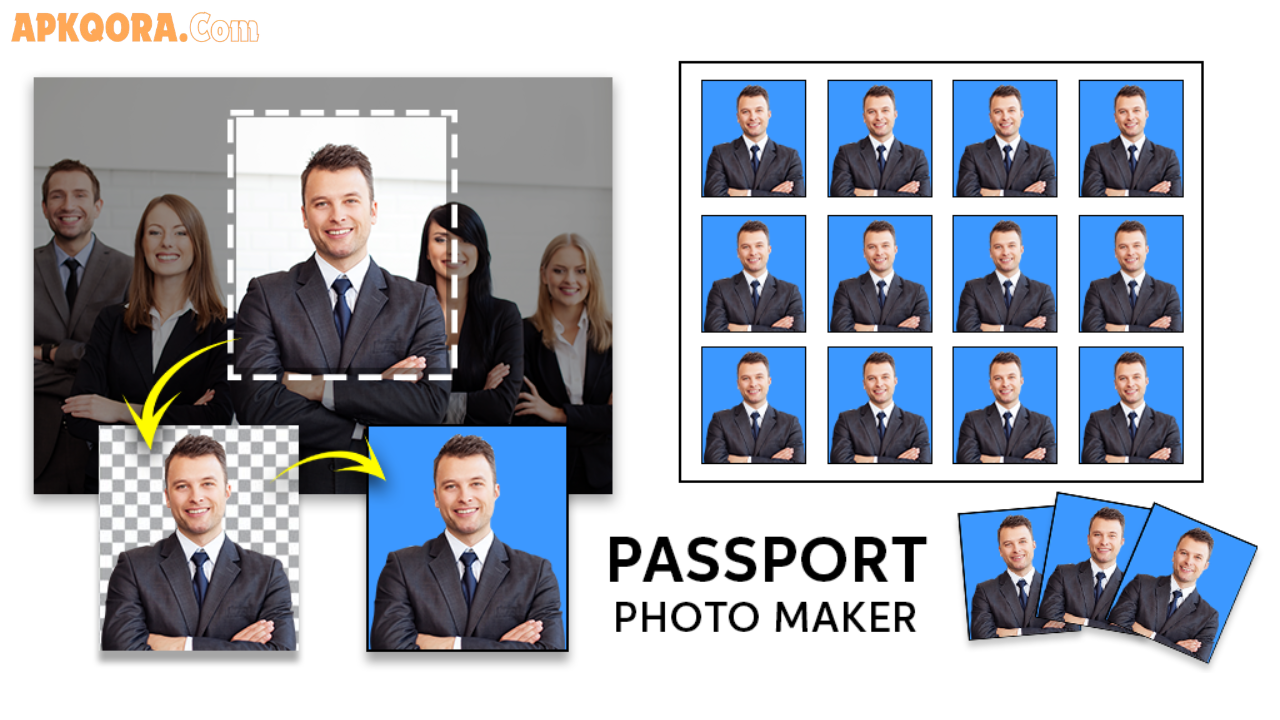
A one-click passport size photo maker is an online tool or app that automatically resizes, crops, and formats your photo to meet official passport or ID photo standards.
You simply upload your picture, and the tool does everything — background removal, face centering, size adjustment, and even printing layout — in just a few seconds.
These tools are designed for everyday users, not photographers. No editing skills are required.
Key Features to Look For
Not all passport photo tools are equal. Here are the features that make a tool truly useful:
- Automatic background removal — Replaces your background with the required white or light grey color
- Face detection and auto-crop — Centers your face according to official guidelines
- Multiple country formats — Supports US, UK, EU, India, Canada, Australia, and many more
- Print layout option — Arranges multiple photos on a single sheet (4×6 or A4) for home printing
- No watermark on free version — Some tools offer clean downloads without forcing a paid upgrade
- Instant preview — Shows exactly how your photo will look before saving
- Mobile friendly — Works smoothly on both Android and iOS browsers
Best Free One Click Passport Photo Maker Tools in 2026
Here are some of the most reliable and widely used tools available today:
1. PhotoAiD
PhotoAiD uses AI to automatically detect your face, remove the background, and resize your image to match over 100 country-specific passport photo requirements. It checks compliance automatically and gives you feedback if something needs adjustment.
Best for: Users who want a professional-level result without any manual editing.
2. IDPhoto4You
This is a completely free, browser-based tool. You upload your photo, choose your country and document type, and it generates a ready-to-print sheet. No account needed, no hidden fees.
Best for: Quick, no-fuss photo creation on desktop or mobile.
3. Passport Photo Online
This tool guides you step by step. It checks lighting, face position, background, and expression. It even warns you if your photo might be rejected. The free version gives you a digital copy instantly.
Best for: First-time users who want guidance through the process.
4. Canva (Passport Photo Template)
Canva offers passport photo templates that you can customize manually. It gives you more creative control, which is useful if you want to adjust the layout for printing or design a custom ID card format.
Best for: Users who are already familiar with Canva and want flexibility.
5. Pixelied
Pixelied is a versatile online editor with a built-in passport photo resizer. You can choose from preset sizes or enter custom dimensions. It’s a great option if you need photos for multiple types of documents.
Best for: Users who need different photo sizes for various document types.
Quick Comparison of Top Tools
| Tool | Free Version | Auto Background | Country Formats | Print Layout |
|---|---|---|---|---|
| PhotoAiD | Yes (limited) | Yes | 100+ | Yes |
| IDPhoto4You | Fully free | Yes | 60+ | Yes |
| Passport Photo Online | Yes | Yes | 100+ | Yes |
| Canva | Yes | Manual | Custom | Yes |
| Pixelied | Yes | Yes | Custom | Yes |
Pros and Cons of Using Online Passport Photo Makers
Pros
- Saves time and money — No need to visit a studio or spend on professional photography
- Available 24/7 — Make your photo any time, from anywhere
- Easy to use — Most tools require zero technical knowledge
- Multiple formats — One tool can handle passports, visas, driving licenses, and more
- Instant results — Your photo is ready in under a minute
Cons
- Photo quality matters — A blurry or poorly lit selfie won’t produce a good result
- Not always officially verified — Some countries have strict requirements that automated tools may miss
- Internet required — Most tools are browser-based and need a stable connection
- Free versions may have limits — Some tools restrict the number of free downloads per day
Practical Tips for the Best Results
Follow these simple tips and your passport photo will look professional every time:
1. Use natural lighting Stand near a window or in a well-lit room. Avoid harsh shadows on your face or behind you.
2. Use a plain background A white wall or plain light-colored surface works best. The tool will handle the rest, but starting with a clean background improves accuracy.
3. Keep a neutral expression Most passport photo rules require a neutral, relaxed expression with your mouth closed and eyes open.
4. Look directly at the camera Your face should be centered and facing forward. Slightly tilted or angled photos are often rejected.
5. Wear appropriate clothing Avoid white tops, as they can blend into the background. Regular everyday clothing is perfectly fine.
6. Check the requirements for your specific country Every country has slightly different size, background, and expression rules. Always verify official guidelines before submitting your photo.
7. Test on multiple tools If one tool gives you a result that doesn’t look right, try another. Each uses a slightly different AI model.
Frequently Asked Questions
Q1: Are free passport photo maker tools accurate enough for official use? Yes, most reputable tools meet official standards for digital submissions. However, if you’re printing and submitting physically, it’s wise to double-check the dimensions and background color against your country’s official passport requirements.
Q2: Can I use my phone camera for a passport photo? Absolutely. Modern smartphones take high-quality photos that are perfectly suitable. Just make sure you have good lighting, a plain background, and that the camera is at eye level.
Q3: What size is a standard passport photo? The most common size is 2×2 inches (51×51 mm) for US passports. Other countries use slightly different dimensions — for example, the UK uses 45×35 mm. Always check your country’s official requirements.
Q4: Will these tools work for visa photos too? Yes. Most passport photo tools also support visa photo formats. You can usually select the document type and country before generating your photo.
Q5: Do I need to create an account to use these tools? Most free tools work without any account or registration. You simply visit the website, upload your photo, and get your result. Some tools may ask you to sign up only if you want to save your photos or access advanced features.
Conclusion
Creating a passport photo no longer requires a trip to the studio or professional equipment. With today’s free one-click passport size photo maker tools, anyone can produce a clean, compliant, and professional-looking photo right from home — in less than a minute.
Whether you use PhotoAiD for its AI-powered accuracy, IDPhoto4You for its simplicity, or Canva for its flexibility, there’s a perfect tool out there for every need.
Take your time, use good lighting, and always verify your photo against official requirements before submitting. A little preparation goes a long way.
Explore the tools listed above and get your passport photo ready today — no studio visit needed.